Pinned Comfy-Org file
The download on this page ships with a 1:1, 0.4MP, multiple-32 ResolutionSelector setting. That is the graph's current starting selector, not a measured recommendation.
Official template · image to video · measured here
This official graph connects one image to the first frame, keeps output size on a separate selector, and loads the same four FL2VA files as T2V. The first measured 1344×768 run is visible before any setup claim.
One connected keyframe
Choose this page when a single keyframe should establish the opening composition and you need to verify the loader stack before queuing a long local job.
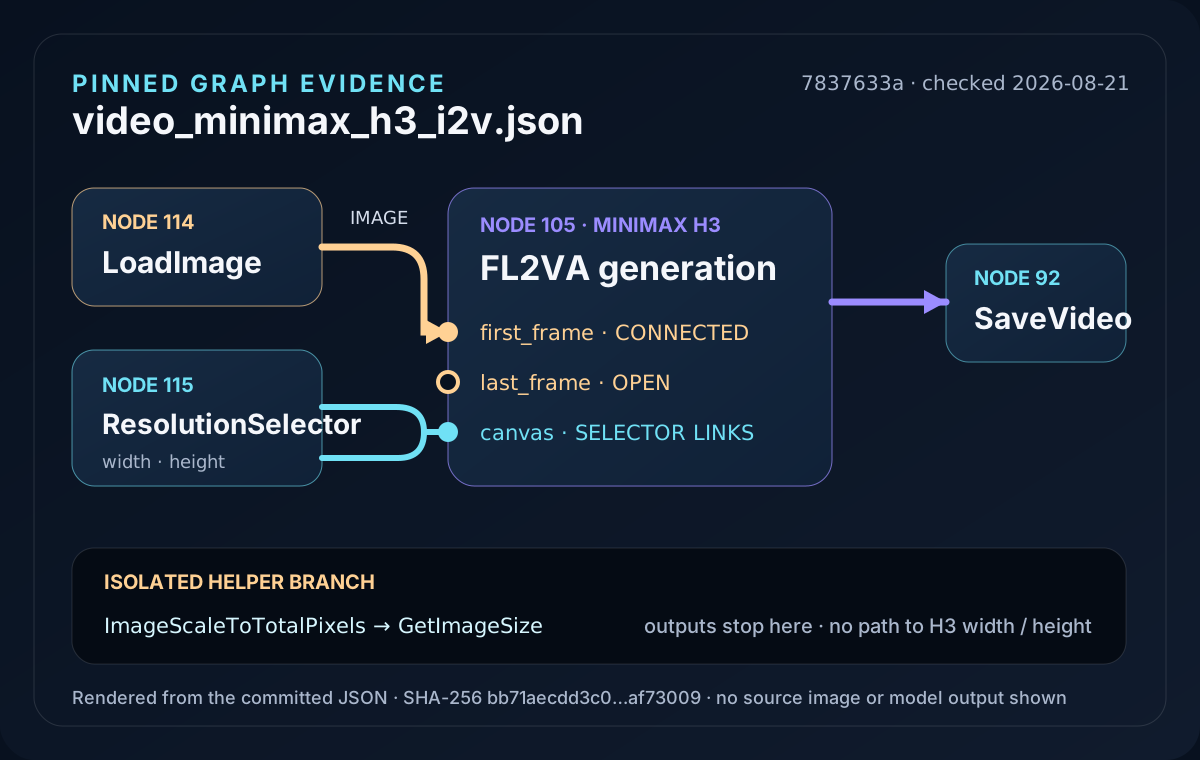
The shipped graph sends LoadImage to the H3 node's first_frame input. The last_frame input is left open, so this file starts from one image rather than locking both ends of the clip.
The prompt still carries the motion, shot and audio direction. The source image anchors the opening material; it does not remove the need to choose an output canvas or write the action. If you want a prompt-only graph, use the T2V template. Reference-media behavior belongs to the R2V template.
MiniMax H3 Community License Agreement (2026-08-02) authorises use, reproduction, modification, distribution and display of the weights and their Outputs only in the Applicable Territories — the world excluding the EU, the UK, the Republic of Korea and the United States. Running the weights locally on your own machine is one of those enumerated acts, so the territory clause applies to a local install too, and §V.4 reaches Outputs as well as the weights themselves. This site quotes and links the license rather than advising on it — read the file-to-license map and the original agreement for your own situation.
Pinned official asset
video_minimax_h3_i2v@7837633a.json44,684 bytes · SHA-256 bb71aecdd3c0b62e56eafe03acb14d1cfeabec7072eaed9cbdf473c2aaf73009
Frozen from Comfy-Org/workflow_templates@7837633a… on 2026-08-21. The template is MIT-licensed; its notice is in LICENSE.txt. The sample image and model weights are separate assets under their own source terms.
The JSON refers to transparent_rgb_gaming_mouse.png, an upstream sample that is not bundled with this site download. After import, choose your own local first-frame image in LoadImage before queuing the graph.
Source-bound visuals
The graph plate is generated from the committed JSON's actual link table: LoadImage reaches first_frame, ResolutionSelector reaches the canvas, and the helper branch stops before H3. The run receipt copies the two public records. No source image or MiniMax-generated frame appears in either visual.
video_minimax_h3_i2v@7837633a.json was read on ; its open and connected ports drive this plate.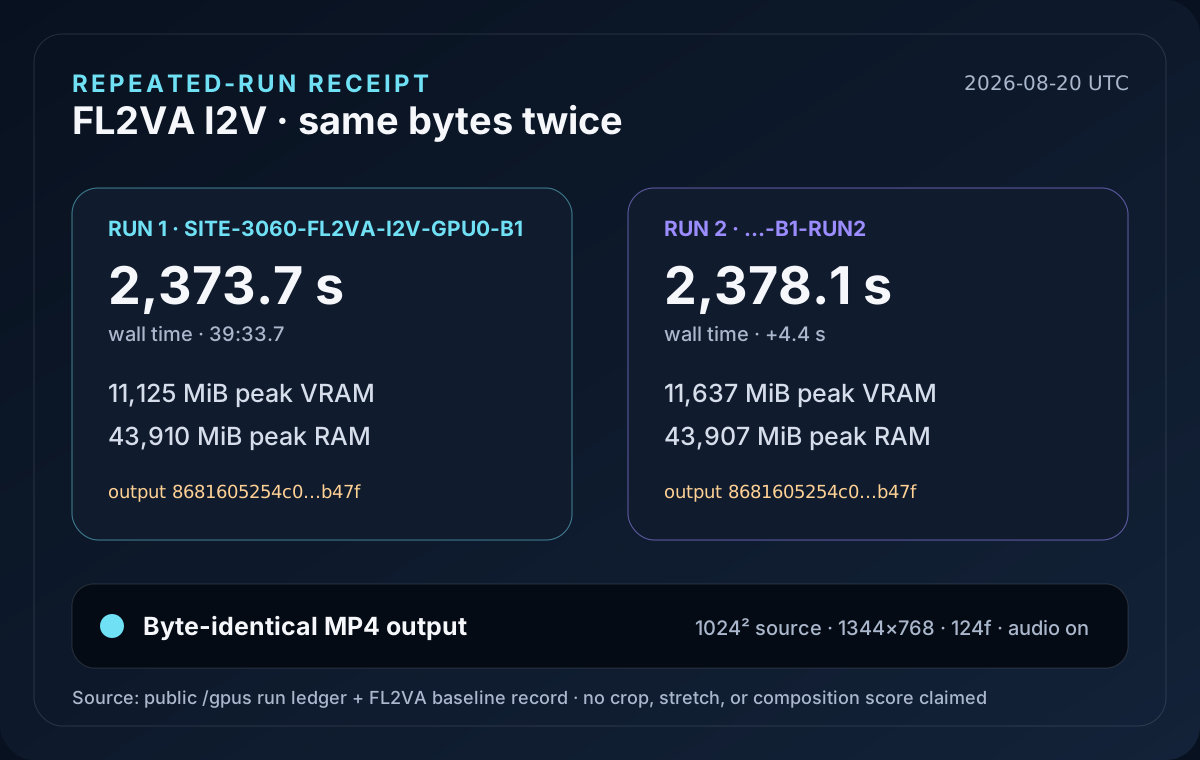
Trace the plate: inspect the frozen I2V file, then compare it with the two public I2V cards and the downloadable FL2VA source report.
No hidden I2V checkpoint
Before running I2V, every loader in the pinned UI graph was read and matched against the test machine's model manifest. The result was four existing files and no I2V-only weight. File name, byte count and SHA-256 are shown so the claim can be checked rather than trusted.
| Loader folder | Exact file | Bytes | SHA-256 |
|---|---|---|---|
diffusion_models | minimax_h3_fl2va_pruned_int8_convrot.safetensors | 20,970,379,616 | e889202c41dafb67b10d67b97f0d8541508036a6090af23425a5c2615d03c47a |
text_encoders | qwen3vl_32b_minimax_h3_nvfp4_awq.safetensors | 15,687,142,551 | 35a88d51044231fe332301d7a62aa81e3f2cba62febeb446e2c1e3e0ef76f2c6 |
vae | minimax_h3_video_vae_fp16.safetensors | 5,207,808,496 | 7c1f131492e7eddacaac9069a61b81bdd39de5cc96561e677c5eab1cdce5e522 |
vae | minimax_h3_audio_vae_fp32.safetensors | 605,254,808 | 8e505d95dd1561d47abd43d4238fd40d9bb1ae9e147ed0a4cba778d76ae4db48 |
The pinned I2V and T2V templates name the same four loader values. The manifest check re-confirmed file names and byte counts on 2026-08-19; the large-file hashes came from the previously verified machine manifest. The only additional benchmark input was the 1024×1024 RGBA sample image, SHA-256 49696748d2fff0e8c9b63c7173c6d6282b70eac0195def5b39402f9564410e75.
Method and source: loader nodes read from the pinned official I2V JSON, checked against the owned-bench manifest on 2026-08-19. The license map separates the base weights, Qwen encoder and MIT workflow instead of assigning one license to the whole folder.
Source image × output canvas
The file does not derive output dimensions from the image. In the pinned graph, LoadImage connects to first_frame, while a separate ResolutionSelector connects to width and height. Two helper nodes named ImageScaleToTotalPixels and GetImageSize are present but do not feed the H3 dimensions.
| Input property | What it changes | Evidence boundary |
|---|---|---|
| Composition and aspect ratio | They determine which output canvas can preserve the subject without forcing a new crop or empty space. | The graph does not auto-match canvas to source; choose both deliberately. |
| Resolution grid | Width and height stay on a multiple-of-32 grid through ResolutionSelector. | Stated in the pinned workflow note and selector value; checked 2026-08-21. |
| Image and canvas disagree | A 1024×1024 source was submitted to the frozen 1344×768 benchmark graph and the run completed. | No validation error occurred. Crop, stretch and composition were not scored, so no visual-behavior claim is made. |
| First versus last frame | This file connects the first frame and leaves the last frame open. | A second endpoint is possible at the node level, but it is not connected in this shipped JSON. |
The download on this page ships with a 1:1, 0.4MP, multiple-32 ResolutionSelector setting. That is the graph's current starting selector, not a measured recommendation.
The separate Turbo I2V example at commit a7e148b8… starts at 16:9, 0.4MP = 864×480. It is a different graph with a Turbo LoRA, cited only as a published default.
The run below fixed 1344×768 directly for 124 frames. It is a measured condition, not a conversion from either default.
External default: ModelTC's pinned I2V example JSON, checked 2026-08-21. No timing or quality comparison is made between that Turbo example and this site's base run.
From graph to first success
Save the pinned video_minimax_h3_i2v.json copy so the graph matches the loader and canvas rules documented here.
Place FL2VA, Qwen3-VL, the video VAE and the audio VAE in the three model folders named by the graph.
The frozen JSON references an upstream sample image that is not bundled with this download, so select a local image in LoadImage before queuing.
ResolutionSelector controls output width and height independently of the source image. Pick an aspect ratio that preserves the composition you need and keep dimensions on the 32-pixel grid.
Confirm that the first-frame connection, native audio path and SaveVideo output work on a small job before increasing the canvas and frame count.
Folder placement, the hidden loader subgraph and first-run diagnostics are maintained in the ComfyUI setup guide. They are linked instead of repeated here so this page can stay with the input-image mechanism.
Site test card
SITE-3060-FL2VA-I2V-GPU0-B1SITE-3060-FL2VA-I2V-GPU0-B1-RUN249696748…e758681605254c00719f7af488c13adb0124136de177c0dde02e906b198cc5cb47fbf4c9a08….video_minimax_h3_i2v.json@7837633a…; API workflow SHA-256 22648d0a8d42cae3207e9d5b0e9def8e55afd2ae4f7d6a2b809271141de30e40.36569548…e0d; seed 20260820; first frame connected; last frame absent.res_multistep; simple; denoise 1; Turbo LoRA off; cache none; SageAttention absent.contaminated=false; one job at a time; ComfyUI process restarted; host page cache uncontrolled.Loader and run archive: open the public FL2VA report for all four weight fingerprints, the source-image digest, API graph hashes, the short proof job and both formal I2V entries.
Both original timings are retained because each run exceeded 30 minutes. The result proves this fixed graph completed on this one machine; it does not turn a 12GB result into an 8GB claim or make the difference from T2V an “image cost.”
Failure routing
Expected for the standalone frozen JSON. Select your own image; the upstream sample asset is not included in this site's download.
Check the ResolutionSelector, not the source-file dimensions. Its width and height links control the H3 output independently.
I2V needs no special checkpoint. Compare all four exact file names and hashes above, then use the loader guide.
The formal pair reached about 43,900 MiB of system RAM. Read the host-memory guide before treating the symptom as VRAM-only.
Keep roles separate
FL2VA Turbo LoRAs can apply to the same model family, but their file names, step counts and shift pairs are a separate configuration surface. The scheduled /loras/turbo guide will own that setup and its same-machine measurements.
Until it ships, this page remains an I2V input and baseline record. The benchmark library holds the existing Turbo run records without turning them into an I2V speed claim.
Decision
Bottom line: this file adds a first-frame image, not a separate I2V checkpoint. Install the same four-file FL2VA stack as T2V, replace the missing upstream sample with your own image and set ResolutionSelector independently of the source dimensions.
The measured 39-minute pair proves this exact graph completed on one RTX 3060 setup. It does not prove how a mismatched aspect ratio will crop, stretch or preserve composition, so use a small test to inspect that visual decision before increasing the workload.
Start by saving the frozen I2V file, substitute your own LoadImage asset, confirm the four fingerprints, then queue a low-cost proof before choosing a larger frame grid.
FAQ
No. Loader-by-loader verification found the same FL2VA diffusion model, Qwen3-VL encoder, video VAE and audio VAE used by T2V. I2V adds a first-frame image, not another model weight.
Our two 1344x768, 124-frame runs took 2,373.7 seconds and 2,378.1 seconds. Both produced complete MP4 files with the same SHA-256.
The pinned graph does not match them automatically: LoadImage feeds first_frame while ResolutionSelector feeds width and height. Our square 1024x1024 source completed at 1344x768, but that run did not score crop, stretch or composition changes.
The pinned workflow's ResolutionSelector and bundled MiniMax H3 note both set a 32-pixel multiple. Keep width and height on that grid instead of entering arbitrary dimensions.
Next checks